Blog · Networking
Synology ports: the DSM default ports list, and which ones you should never forward (2026)
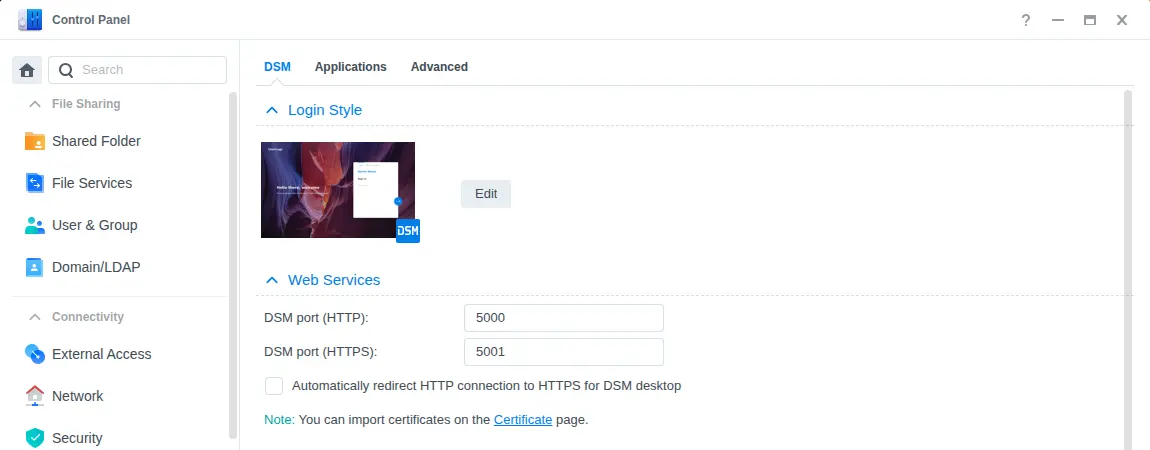
Your Synology NAS speaks through a couple of dozen network ports, and sooner or later a router, a firewall or a forum post asks you which ones. Here's the list that matters, taken from Synology's own documentation, plus a screenshot of where DSM keeps its ports, how to change them, and a blunt traffic-light guide to forwarding. Spoiler: the shortest list is the best one.
TL;DR
- DSM default ports:
5000(HTTP) and5001(HTTPS). Synology Photos, File Station and most mobile apps ride on the same two. - File sharing: SMB is
445, AFP548, NFS2049plus helpers, WebDAV5005/5006, SSH/SFTP22. - Change them in Control Panel → Login Portal. Useful for clashes, not much for security.
- Never forward SMB, port 5000, SSH or Telnet. If you forward anything, make it one VPN port.
- Behind CGNAT, no forwarded port works at all. You need a tool where the NAS dials out.
Synology default ports: DSM 5000 and 5001
Out of the box, DSM listens on TCP 5000 for HTTP and TCP 5001 for HTTPS. That's the address you type as http://192.168.1.10:5000, and it's busier than it looks: File Station, Synology Photos, Download Station, Surveillance Station, Calendar, Chat, Contacts and Note Station are all web apps inside DSM, so they share the same two ports. So do nearly all of Synology's mobile apps (DS file, DS get, DS audio, DS cam, the Synology Photos and Synology Drive apps).
That's convenient on your LAN, and slightly alarming when you realise forwarding “just Photos” means forwarding the whole DSM login page. One port, many doors, and the admin console is one of them.
The Synology ports list (the ones you'll actually meet)
Synology's knowledge-base article lists well over a hundred ports, including MailPlus' impressive collection and a section on eMule. Here are the ones home and small-office NAS owners run into, straight from that list (last updated by Synology on 1 October 2026):
| Service | Port(s) | Protocol | Notes |
|---|---|---|---|
| DSM web UI | 5000 (HTTP), 5001 (HTTPS) | TCP | Also File Station, Synology Photos, Download Station, Surveillance Station, Calendar, Chat, Note Station |
| Synology mobile apps | 5000, 5001 | TCP | DS file, DS audio, DS cam, DS get, DS video, Synology Photos, Synology Drive app |
| SMB / Windows file sharing | 445, 139 (TCP/UDP); 137, 138 (UDP) | TCP/UDP | What a mapped drive uses |
| AFP (old Mac sharing) | 548 | TCP | Legacy; macOS uses SMB now |
| NFS | 111, 662, 892, 4045, 2049 | TCP/UDP | Linux and VMware clients |
| WebDAV | 5005 (HTTP), 5006 (HTTPS) | TCP | Also a Hyper Backup destination |
| FTP / FTPS | 21, 20, passive 1025–65535 | TCP | Passive range is configurable, and should be |
| SSH / SFTP | 22 | TCP | rsync over SSH also uses it |
| Telnet | 23 | TCP | Off by default. Leave it that way |
| rsync / Hyper Backup | 873 (22 if encrypted) | TCP | NAS-to-NAS backup |
| Hyper Backup Vault | 6281, 5000, 5001 | TCP | Backup target on DSM 7 |
| Snapshot Replication | 5566, 5000, 5001 | TCP | Shared folders and LUNs |
| Synology Drive Server | 6690, 5000, 5001, 80, 443 | TCP | 6690 is Drive Client sync; 80/443 for share links |
| Web Station / Photo Station | 80, 443 | TCP | Your own websites; legacy Photo Station |
| Active Backup for Business | 5510 | TCP | Agent to NAS |
| VPN Server: OpenVPN | 1194 | UDP | Changeable in the package |
| VPN Server: L2TP/IPSec | 500, 1701, 4500 | UDP | |
| VPN Server: PPTP | 1723 | TCP | Plus GRE passthrough. Obsolete |
| iSCSI | 3260 (also 3263, 3265) | TCP | SAN Manager targets |
| Media Server (DLNA) | 1900, 50001, 50002 | TCP/UDP | LAN streaming to TVs |
| Synology Assistant | 9997, 9998, 9999 | UDP | Finding the NAS on your LAN |
| SNMP | 161 | TCP/UDP | Monitoring |
| Bonjour | 5353 | UDP | Discovery on the LAN |
Most of these only listen if you've turned the service on. A fresh DSM doesn't run FTP, Telnet, NFS or WebDAV until you enable them in Control Panel → File Services or Terminal & SNMP. Which is one more reason to check what's enabled before you open anything.
How to change the DSM ports (5000/5001)
- Open Control Panel → Login Portal (on DSM 6 this lived under Network → DSM Settings).
- On the DSM tab, under Web Services, change DSM port (HTTP) and DSM port (HTTPS). Pick something above 1024 that nothing else uses.
- Tick Automatically redirect HTTP connection to HTTPS while you're here. There's no good reason to log in over plain HTTP.
- Click Save. Your browser loses the connection. Reopen DSM on the new port, and update bookmarks, port-forwarding rules and the firewall.
Before you feel safer: moving DSM to port 5821 hides it from bots that only check the defaults, and from nobody else. A scanner that sweeps all 65,535 ports finds the login page anyway. Changing ports is like moving your front door two metres to the left. Handy if the old spot clashes with something (the Applications tab lets you give individual apps their own ports, too), but it's not a lock.
Which Synology ports to forward (and which never to)
Every forwarded port is a service that strangers can reach, so the question isn't “which ports does Synology use” but “which ones am I willing to defend”. Here's our take:
| Port | Forward it? | Why |
|---|---|---|
| 445, 139, 137, 138 — SMB | ✗Never | The most-attacked file protocol on the internet. Many ISPs block 445 outright |
| 5000 — DSM over HTTP | ✗Never | Your admin password in plain text, to anyone on the path |
| 22 — SSH | ✗No | Bots try passwords on port 22 all day, every day |
| 23 — Telnet, 21 — FTP | ✗No | Unencrypted logins. FTP's passive range also means opening thousands of ports |
| 5001 — DSM over HTTPS | ~Only with care | Puts your login page on the internet. HTTPS, 2FA, Auto Block, and a patched DSM are the minimum |
| 80, 443 — Web Station | ~If you host a site | Fine for a public website, preferably behind a reverse proxy rather than straight into DSM |
| 6690 — Drive Client | ~If you must | Exposes the Drive service. Drive Client also works over QuickConnect |
| 1194 UDP — OpenVPN | ✓The sensible one | One port, and everything else stays private behind it. Needs a real public IP |
The pattern: services that ask for a password shouldn't face the internet, and on a NAS that's nearly all of them. That's not hypothetical. Outdated Synology boxes with exposed logins are being hit by ransomware right now. If you need DSM from outside, the safer patterns are a VPN (one port, see how to set up Synology VPN Server) or a reverse proxy on 443 with a proper certificate, never a raw forward of 5000.
And whatever you forward, turn on DSM's firewall, Auto Block and 2-factor sign-in, and keep DSM updated. Security Advisor in DSM will happily nag you about most of this.
Forwarded the port and it still doesn't work?
- You tested from home. Many routers don't support NAT loopback, so your own public IP fails from inside. Test from a phone on mobile data.
- The rule points at an old IP. Give the NAS a DHCP reservation so its LAN address never changes.
- DSM's firewall is on and doesn't allow the port. Control Panel → Security → Firewall (how to set up Synology firewall rules).
- Your ISP blocks it. Port 445 is commonly blocked; 80 and 25 sometimes are too.
- You're behind CGNAT. If your router's WAN address starts with
100.64–100.127, or doesn't match what a “what's my IP” site shows, your ISP shares one public IP among many customers. No forwarding rule on your router can ever be reached. Here's the full CGNAT explanation, and what to do instead.
The zero-port option: let the NAS dial out
The ports you never forward can't be attacked from the internet, and can't break when your ISP switches you to CGNAT. That's the idea behind every tool where the NAS makes an outbound connection instead of waiting for one. QuickConnect does this for DSM and Synology's apps (via Synology's relay when it can't go direct). Tailscale gives you a whole private network. Cloudflare Tunnel publishes web apps on your own domain. All three are good at what they do.
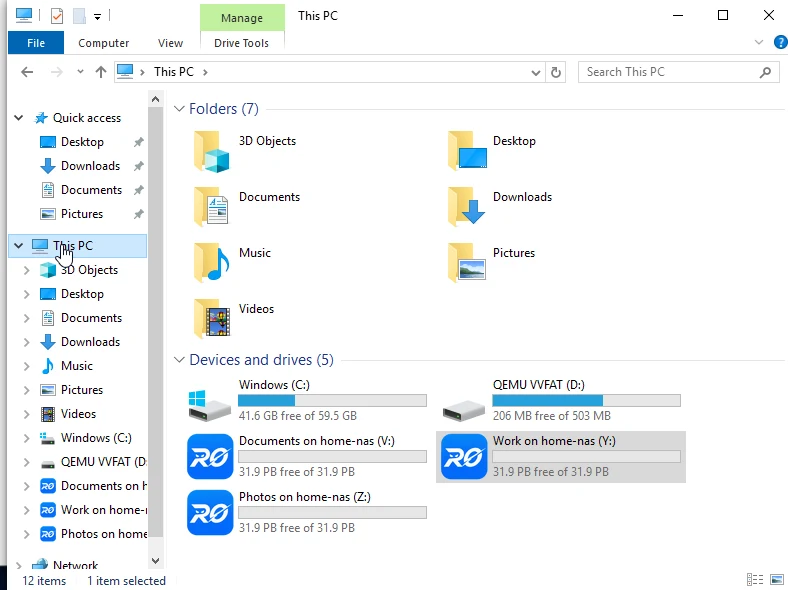
If what you actually wanted from port 445 was your NAS as a drive, that's the job RocketZero does. Install the package on the NAS and the desktop app on Windows or macOS, sign in with your existing DSM username and password, and your shares appear as real network drives: Z: in Explorer, or in Finder. No port forwarding, no DDNS, works behind CGNAT. The drive runs over WireGuard, peer-to-peer when the network allows and through an encrypted relay when it doesn't, end-to-end encrypted either way. Your router's port-forwarding page can stay blissfully empty.
The honest small print: RocketZero also gives your NAS an <id>.roze.to address that opens DSM and its web apps in a browser, but that path is a hosted reverse proxy with TLS terminated at our relay (the Cloudflare Tunnel model), so it isn't end-to-end encrypted. Only the drive is. It doesn't carry Synology Drive Client's port 6690, and DSM's 2FA protects the web UI, not the drive mount, so use a dedicated account with a strong password.
RocketZero ships today for Synology DSM 7, OpenMediaVault 7 and TrueNAS SCALE, with desktop apps for Windows and macOS (on first launch on macOS you'll need to allow it in System Settings → Privacy & Security). Setup walkthrough: the RocketZero setup guide.
Forward a port if…
- you have a real public IP and control the router;
- it's one VPN port, or a website you're happy to maintain;
- you'll keep DSM patched and 2FA on.
Forward nothing if…
- you're behind CGNAT, or can't touch the router;
- you'd rather have no login page on the internet;
- you just want your NAS as a drive: download RocketZero.
FAQ
What are the default Synology DSM ports?
DSM uses TCP 5000 for HTTP and TCP 5001 for HTTPS. File Station, Synology Photos, Download Station, Surveillance Station and most Synology mobile apps use the same two ports. You can see and change them in Control Panel → Login Portal → DSM.
Should I change port 5000 and 5001?
Changing them hides DSM from the laziest scanners, and that's about it. A full port scan still finds the login page in minutes. It's fine to do, but it's not security. The real fix is not exposing DSM to the internet at all: use a VPN or a tool where the NAS connects outward.
What port does Synology Photos use?
Synology Photos runs inside DSM, so it uses 5000 (HTTP) and 5001 (HTTPS), both in the browser and in the mobile app. The older Photo Station and the DS photo app used 80 and 443 instead.
What port does Synology Drive use?
Synology Drive Server uses TCP 6690 for syncing and backup from Drive Client, plus 5000/5001 for the web portal and the mobile app, and 80/443 for link sharing.
Which port does SMB use on Synology?
SMB uses TCP 445 (and 139 for the old NetBIOS session service), with UDP 137 and 138 for NetBIOS name and datagram services. Never forward any of them to the internet. Many ISPs block 445 anyway, and SMB is a favourite target for worms and ransomware.
Does QuickConnect need port forwarding?
No. QuickConnect has the NAS connect out to Synology's servers, so you don't open any port on the router. When a direct path isn't possible, traffic goes through Synology's relay, which is why it can be slow.
Can I access my Synology NAS remotely without opening any ports?
Yes. Anything where the NAS dials out works without inbound ports, including behind CGNAT: QuickConnect, Tailscale, Cloudflare Tunnel and RocketZero. RocketZero mounts the NAS as a real network drive on Windows or macOS over WireGuard, with no port forwarding and no DDNS.
Close the ports. Keep the drive.
RocketZero mounts your NAS as a drive from anywhere: no port forwarding, no DDNS, works behind CGNAT, no extra account. Free to get started.
Download RocketZero Read the setup guide