Blog · Networking
Synology VPN Server: how to set it up in DSM 7, and the WireGuard question (2026)
A VPN is the grown-up way to reach your NAS: no login page on the internet, just a private tunnel into your own network. Synology VPN Server gives you one for free, in about ten minutes, with a few defaults that will leave you staring at a “connected” icon and no files. Here's the setup using the real settings from our lab, a table of fixes, the truth about WireGuard, and the one network where none of this can work.
TL;DR
- Install: Package Center → VPN Server. Free, and it runs entirely on your NAS.
- Pick OpenVPN. Forward UDP 1194, export the profile, and replace
YOUR_SERVER_IPin it. - Tick Allow clients to access server's LAN. It's off by default, and it's the classic “connected, but nothing works”.
- No WireGuard. VPN Server offers OpenVPN, L2TP/IPSec and PPTP. WireGuard takes a third-party route.
- You need a real public IP. Behind CGNAT, the connection stops at your ISP.
What Synology VPN Server actually does
VPN Server turns your NAS into the far end of a private tunnel. Your laptop or phone connects to it, gets an address on a private VPN subnet, and from then on it can reach the NAS (and, if you allow it, your whole home network) as though it were on the sofa. DSM, SMB shares, Jellyfin, your printer's admin page: nothing has to be published to the internet one service at a time.
That's a real advantage over a reverse proxy, and over any setup that leaves a DSM login page facing the world. It also runs on your own hardware with no third-party account. In exchange you get one open port, some client setup on each device, and the job of keeping it all patched.
Check two things before you start. You need a real public IP, because this method dies behind CGNAT (here's the 30-second check). And you need a stable address for that IP, which usually means a free synology.me name (Synology DDNS setup). If you fail the first check, skip to the CGNAT section and keep your evening.
OpenVPN, L2TP or PPTP: which one to choose
VPN Server offers three protocols, one of which belongs in a museum:
| Protocol | Ports to forward | Client | Verdict |
|---|---|---|---|
| OpenVPN | UDP 1194 (changeable; TCP is an option) | Needs an OpenVPN app on each device | The one to pick |
| L2TP/IPSec | UDP 500, 1701, 4500 | Built into Windows, macOS and iOS | Fine when you can't install an app |
| PPTP | TCP 1723, plus GRE passthrough | Apple removed it in iOS 10 and macOS Sierra | Leave it off |
Use OpenVPN unless you have a reason not to. It needs one forwarded port and a free client app, and it's the option with the most control. L2TP/IPSec is the fallback for devices where you can't install anything, and it relies on a pre-shared key, so make that long and random. PPTP stays off: Apple dropped it years ago, and in 2024 Microsoft announced it's deprecating both PPTP and L2TP on future versions of Windows Server. That applies to Windows acting as the server, not to your NAS, but it does show which way the wind is blowing.
How to set up OpenVPN on Synology, step by step
- Install it. Package Center → search VPN Server → Install.
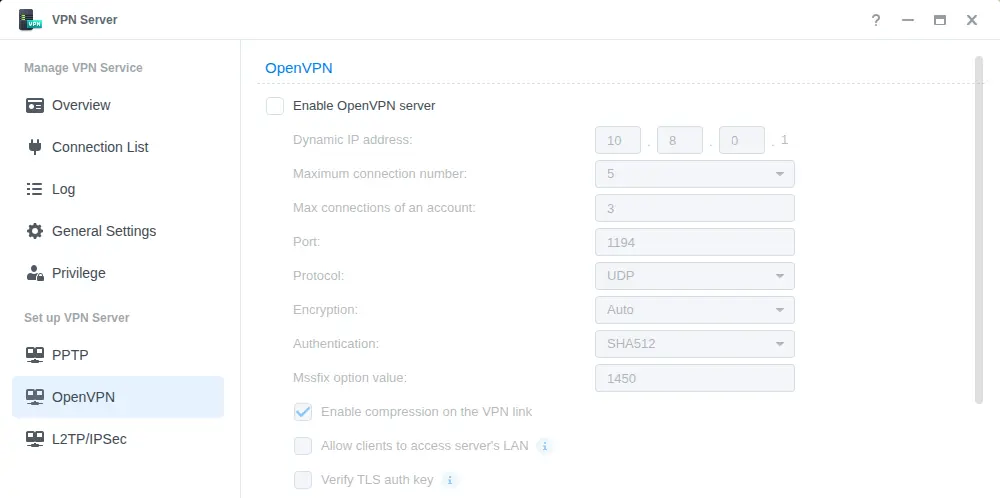
- Enable OpenVPN. Open VPN Server → OpenVPN → tick Enable OpenVPN server.
- Tick Allow clients to access server's LAN if you want more than the NAS itself. Most people do.
- Click Apply, then Export Configuration. You get a zip with the
VPNConfig.ovpnprofile, the CA certificate and a README. - Forward the port. On your router, send UDP 1194 to the NAS's LAN IP. If DSM's firewall is on, allow it there too.
- Edit the profile. Replace
YOUR_SERVER_IPwith your DDNS name. To send all your traffic through home, remove the#beforeredirect-gateway def1. Leave it alone to send only NAS traffic. - Connect. Import the profile into an OpenVPN client (OpenVPN GUI on Windows, Tunnelblick on Mac, OpenVPN Connect on phones) and sign in with your DSM username and password.
- Test from outside. Use a phone on mobile data, not your sofa. Testing from inside your own network proves very little.
The defaults worth changing
- Allow clients to access server's LAN: off. With it off, you reach the NAS but not your other devices. Sensible as a default, baffling as a first experience.
- Grant VPN permission to newly added local users: on. Find this in General Settings. Every local account you create from now on can use the VPN, including the one you made for your cousin's photo uploads. Untick it, then allow specific accounts in Privilege.
- Maximum connection number: 5, and 3 per account. A family with phones and laptops will find this limit quickly.
- Enable compression on the VPN link: on. OpenVPN's own documentation warns that compression can weaken security, so we'd turn it off. Export the profile again afterwards, because the client's settings have to match.
- Verify TLS auth key: off. Turning it on makes the server drop packets without the shared key, which reduces what a port scanner can poke at. Export again here too.
Synology WireGuard: the honest answer
You've probably seen guides promising “native WireGuard” on Synology. We looked for it. Synology's VPN Server spec for DSM 7.4 lists OpenVPN, L2TP over IPSec and PPTP, and our DSM 7.2 lab has no WireGuard kernel module. So the realistic options are:
- A third-party package. Community builds such as the Blackvoid SPKs add the module. They work and they're maintained by volunteers, but they aren't supported by Synology, setup means SSH and root, and a DSM upgrade may mean reinstalling.
- A container.
wg-easyand friends give you a pleasant UI. A container shares the host's kernel, though, so kernel-mode WireGuard still needs that module, unless you run a userspace build. - Something built on WireGuard. Tailscale has a DSM package and handles the keys and the NAT traversal for you. RocketZero uses the same core technology, aimed at mounting drives rather than building a network.
One catch people miss: a self-hosted WireGuard server is still a listening server. It needs a forwarded UDP port and a public IP, just like OpenVPN. A faster protocol doesn't fix CGNAT.
Synology VPN not working? Symptom → fix
| Symptom | Usually means | Fix |
|---|---|---|
| Times out, never asks for a password | Port not forwarded, wrong address, or CGNAT | Forward UDP 1194, check your router's WAN IP, test from mobile data |
| Client can't find the server | Profile still says YOUR_SERVER_IP | Edit the remote line in the .ovpn file |
| AUTH_FAILED or wrong credentials | Account has no VPN permission, or a typo | VPN Server → Privilege, then check Log |
| Connected, but only the NAS answers | LAN access is off (the default) | Tick Allow clients to access server's LAN, Apply, reconnect |
| Connected, but LAN addresses go nowhere | Same subnet at both ends | Use the NAS's VPN address (10.8.0.1), or renumber your home LAN |
| TLS handshake failed | Profile no longer matches the server | Export the configuration again after changing server settings |
| Websites break while connected | Full-tunnel routing without working DNS | Remove redirect-gateway def1, or set a dhcp-option DNS line |
| New connections refused | Hit the limit: 5 total, 3 per account | Raise both numbers in the OpenVPN panel |
| Certificate expired or replaced | Profile holds the old CA | Control Panel → Security → Certificate, then export again |
| Windows L2TP fails with error 809 | NAS is behind NAT, which Windows rejects by default | Set AssumeUDPEncapsulationContextOnSendRule to 2, then restart Windows |
The Windows fix is a DWORD under HKLM\SYSTEM\CurrentControlSet\Services\PolicyAgent, set on the client. Microsoft documents it here. It isn't guaranteed to cure every L2TP failure, which is one more reason to prefer OpenVPN.
Mapping a drive over the VPN
Once connected, SMB behaves as it does at home, so you can map a network drive to \\192.168.1.10\share (with LAN access on) or to the NAS's own VPN address, \\10.8.0.1\share. The second one also survives the hotel whose Wi-Fi uses the same 192.168.1.x as your house. The catch is that the drive only works while the tunnel is up, so someone has to remember to connect first, and that someone is usually you, on the phone, talking a relative through it.
On security: forwarding one VPN port is far better than exposing DSM or, heaven forbid, SMB. But the port still faces the internet, and we found no 2FA setting in VPN Server, so a password is all that stands behind it. Use a dedicated account with a long password, leave Auto Block on, and keep DSM patched. Outdated Synology boxes are an active ransomware target right now.
Behind CGNAT, or tired of client profiles?
VPN Server waits for inbound connections, so behind CGNAT it has nothing to wait for. (The OpenVPN panel does offer an IPv6 server mode, which can help if your home and every network you visit have working IPv6. That's a big “if”.) The fix is a tool where the NAS dials out. For a whole private network, that's Tailscale. For web apps on your own domain, it's Cloudflare Tunnel. For the common case of “I just want my files”, there's RocketZero.
Install the package on the NAS and the desktop app on Windows or macOS, sign in with your existing DSM username and password, and your shares show up as real drives: Z: in Explorer, or in Finder. There's no port forwarding, no DDNS, no kernel module and no client profile to edit, and it works behind CGNAT. The drive runs over WireGuard, direct peer-to-peer when the network allows and through an encrypted relay when it doesn't, end-to-end encrypted either way.
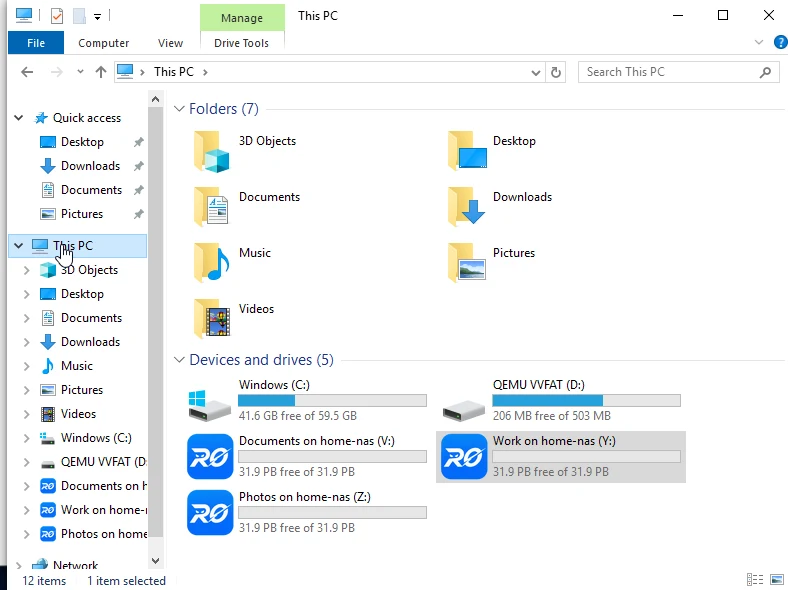
Here's what it won't do, because a VPN article should be straight about this. RocketZero isn't a VPN into your home network: it won't reach your printer or your other computers. You also get an <id>.roze.to address that opens DSM and its web apps in a browser, but that path is a hosted reverse proxy with TLS terminated at our relay, so it isn't end-to-end encrypted. Only the drive is.
RocketZero ships today for Synology DSM 7, OpenMediaVault 7 and TrueNAS SCALE, with desktop apps for Windows and macOS (on first launch on macOS, you'll need to allow it in System Settings → Privacy & Security). It doesn't carry Synology Drive Client (port 6690), and DSM's 2FA protects the web UI, not the drive mount, so a dedicated remote-access account is a good idea here too. Full walkthrough: the RocketZero setup guide.
VPN Server, or something else?
Use Synology VPN Server if…
- you have a real public IP and can forward a port;
- you want your whole home network, not just the NAS;
- you want no third party involved, and you're happy managing profiles.
Use something that dials out if…
- you're behind CGNAT, or can't touch the router;
- you'd rather have no open ports at all;
- you just want your NAS as a drive: download RocketZero.
Synology VPN Server is a good, free, slightly old-school tool. Tick the LAN box, untick the automatic permissions, and it will quietly do its job for years, provided your ISP has actually given you a front door.
FAQ
Is Synology VPN Server free?
Yes. It's a free package in DSM's Package Center. Synology's spec page lists up to 40 concurrent connections, with the real limit depending on your model. The default in the OpenVPN panel is much lower: 5 in total and 3 per account.
Does Synology VPN Server support WireGuard?
No. Synology's VPN Server spec for DSM 7.4 lists OpenVPN, L2TP over IPSec and PPTP, and the panels in our lab show the same three. WireGuard on a Synology NAS means a third-party package, a container, or a product built on WireGuard such as Tailscale or RocketZero.
What ports do I need to forward for Synology VPN Server?
OpenVPN: UDP 1194 by default (you can change it). L2TP/IPSec: UDP 500, 1701 and 4500. PPTP: TCP 1723, plus GRE passthrough on the router. Forward only the protocol you actually use.
Does Synology VPN Server work behind CGNAT?
Not over IPv4. It waits for inbound connections, and behind CGNAT those stop at your ISP. IPv6 can be a way out if both ends have it, since the OpenVPN panel has an IPv6 server mode. Otherwise use something the NAS dials out from: Tailscale, QuickConnect, Cloudflare Tunnel or RocketZero.
Why can I connect to the VPN but not reach my other devices?
On OpenVPN, Allow clients to access server's LAN is unticked by default. Tick it, click Apply, and reconnect. If it's already on, check that the network you're visiting doesn't use the same subnet as your home network, such as 192.168.1.x at both ends.
Is QuickConnect a VPN?
No. QuickConnect is Synology's relay service for reaching DSM and Synology's own apps. It doesn't put your device on your home network, and it doesn't give you a mapped SMB drive.
Does Synology VPN Server support 2FA?
We found no 2FA or one-time-password setting in any VPN Server panel on our lab NAS (package version 1.4.10). Plan for password-only sign-in: use a dedicated account with a long password, and keep Auto Block on.
Skip the port forwarding entirely
RocketZero mounts your NAS as a drive from anywhere: no port forwarding, no DDNS, works behind CGNAT, no extra account. Free to get started.
Download RocketZero Read the setup guide