Blog · Networking
CGNAT port forwarding: why it fails, and how to reach your NAS anyway (2026)
You followed the guide. You created the rule. You opened port 5001 with the quiet confidence of someone who has done this before. And the internet still can't see your NAS. If your ISP uses CGNAT, that's not you doing it wrong — it's you knocking on a door that belongs to someone else. Here's how to tell, why forwarding can't work, and the real ways around it.
TL;DR
- CGNAT (carrier-grade NAT) means your ISP shares one public IPv4 address between many customers. Your router doesn't have a public IP, so port forwarding on it can't work.
- Check in 30 seconds: if your router's WAN IP differs from what “what is my IP” shows — especially if it starts with
100.64–100.127— you're behind CGNAT. - Fixes, in order: ask your ISP for a public IP → try IPv6 → or use something that connects outward from the NAS (a VPS tunnel, Tailscale, Cloudflare Tunnel, QuickConnect, RocketZero).
- If what you want is your NAS as a drive, the outward-connecting tools that carry SMB are the short list.
What CGNAT actually is (in one paragraph)
The world ran out of IPv4 addresses a while ago, and ISPs responded the way a landlord responds to a housing shortage: bunk beds. With carrier-grade NAT, your ISP puts many customers behind a single public IPv4 address and hands each home router an address from a special shared range, 100.64.0.0/10. Outbound traffic works perfectly — that's why Netflix, Zoom and everything else seem fine. Inbound traffic has a problem: when a connection arrives at the shared public address, the ISP's NAT has no idea which of its customers it's for, so it drops it. CGNAT is especially common on fixed-wireless 5G, satellite and mobile connections, and increasingly on regular home broadband too.
Why port forwarding behind CGNAT can't work
Port forwarding is an instruction to your router: “when someone knocks on port 5001, send them to the NAS.” That's a great instruction — on a router that owns the front door. Behind CGNAT, your router lives in an apartment, and the front door of the building is the ISP's NAT. Nobody ever knocks on your router's port 5001, because nobody on the internet can reach your router at all.
Which is why DSM's own port-forwarding page can be perfectly filled in and still do nothing. Here's that page in our lab — the tool is fine; it just can't fix a NAT it doesn't control:
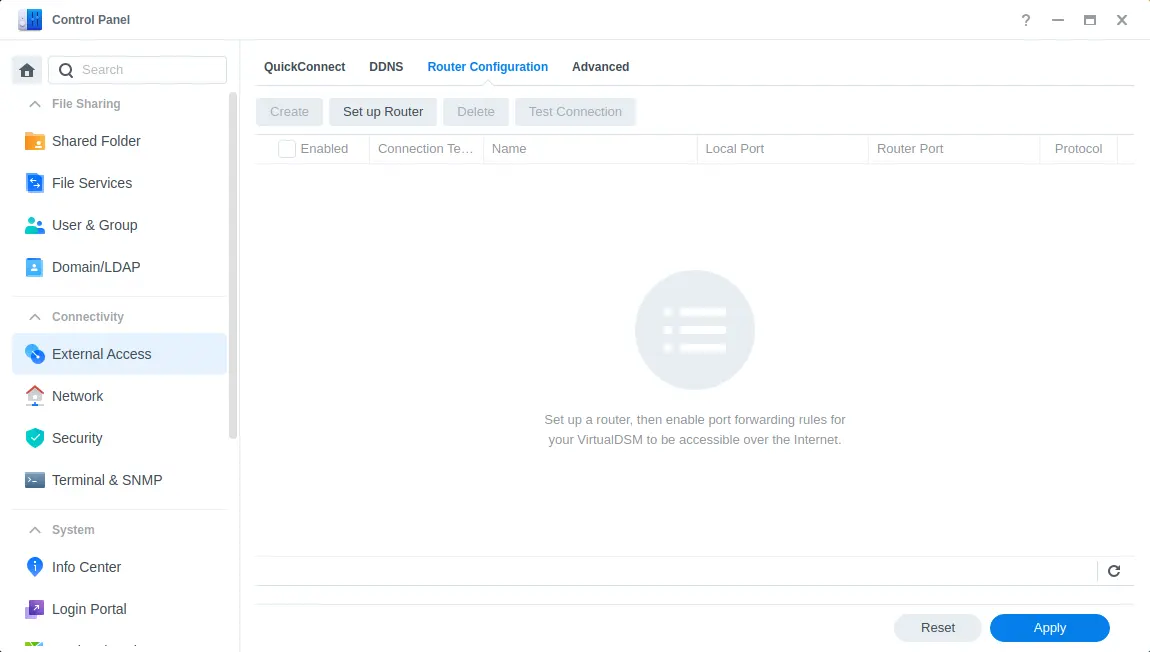
Same story everywhere: UPnP, the forwarding screen on your router, OpenMediaVault, TrueNAS — none of them can reach past your own router. The rule isn't wrong. It's just addressed to the wrong building.
How to check if you're behind CGNAT (30 seconds)
- Find your router's WAN IP. Log in to the router and look at its status or internet page for “WAN IP” / “Internet IP”.
- Find your real public IP. Search “what is my IP” from any device at home.
- Compare. Same address → you're not behind CGNAT (your problem is elsewhere: firewall, wrong port, ISP blocking a specific port). Different address → something between your router and the internet is doing NAT.
- Read the WAN IP. Anything from
100.64.0.0to100.127.255.255is the CGNAT range — case closed. A private address such as192.168.x.xor10.x.x.xusually means double NAT behind your ISP's own modem/router instead; putting that box in bridge mode (or forwarding on it too) often fixes things without any of the workarounds below.
Fun twist: Tailscale also uses addresses from 100.64.0.0/10 for its devices. If you see a 100.x address on a laptop running Tailscale, that's the tailnet, not your ISP. Check the router's WAN IP, not your computer's.
6 real ways to reach your NAS behind CGNAT
Every working option does one of two things: get you a real public address back, or flip the direction so the NAS connects out to something reachable. Here's how they compare when the goal is your NAS — not a game server.
| Option | Works behind CGNAT? | NAS as a mapped drive? | Effort | The catch |
|---|---|---|---|---|
| Ask your ISP for a public IP | ✓Yes, once you have it | ~Only with port forwarding or a VPN on top | Low (one ticket) | May cost extra or not exist on your plan |
| IPv6 | ~If both ends have IPv6 | ~Possible, with firewall work | Medium | The café / office / phone network decides |
| VPS + WireGuard tunnel | ✓Yes | ✓Yes, over the VPN | High | You now run (and patch) a server |
| Port-forwarding VPN add-on | ~Usually, for a few ports | ~Only by exposing SMB — please don't | Medium | Paid, and your NAS is public again |
| Cloudflare Tunnel | ✓Yes | ✗Not what it's for | Medium | Brilliant for web apps, not for drives |
| Tailscale | ✓Yes | ✓Yes, via the tailnet IP | Medium | You get a whole network to manage |
| Synology QuickConnect | ✓Yes (Synology only) | ✗No — doesn't carry SMB | Low | Often relayed, so often slow |
| RocketZero | ✓Yes | ✓Yes — a real drive letter / Finder | Low | DSM, OMV and TrueNAS SCALE only |
1. Ask your ISP for a public IP
Boring, cheap, and the only option that actually removes CGNAT. Some ISPs move you off it for free if you ask; some sell it as a “static IP” add-on; some just say no. One support ticket costs you nothing. Keep in mind this only gets you back to square one — you're then into port forwarding and DDNS, with your NAS login page on the open internet, which is a whole other hobby.
2. Use IPv6
CGNAT is an IPv4 shortage problem, and many CGNAT ISPs give every home public IPv6. Your NAS may already have a globally reachable IPv6 address. The problem is the other end: the hotel Wi-Fi, office network or phone carrier you connect from also needs IPv6, and you still need firewall rules and a hostname. It works beautifully from some places and not at all from others, which is the least fun kind of reliable.
3. Rent a VPS and tunnel through it
Spin up a small cloud server with a public IP, connect your NAS to it over WireGuard, and route traffic in through the server. It's the classic homelab answer and it works great — for people who enjoy being the network admin. You now own a server: updates, firewall, monitoring, and the 2 a.m. realisation that the VPS rebooted and the tunnel didn't come back.
4. A VPN with a port-forwarding add-on
Several commercial VPN providers sell port forwarding that lands on a device behind CGNAT. It's how most of the top search results for this question make their money, and it's legitimate for things like game servers. For a NAS, it mostly re-creates the old setup — a public port pointing at your storage — and the forwarded port is usually assigned to you rather than chosen. Exposing SMB this way is a firm no.
5. Cloudflare Tunnel or Tailscale
Both connect outward, so both shrug at CGNAT. Cloudflare Tunnel is excellent for publishing web apps — DSM, Photos, Jellyfin — behind your own domain; it's not built for mounting a network drive. Tailscale is a superb WireGuard mesh: install it on the NAS and your devices, and you can reach SMB at the NAS's tailnet IP. It hands you an entire private network, which is wonderful if you wanted a network — you may just have wanted your files. We compared both in detail: RocketZero vs Cloudflare Tunnel and RocketZero vs Tailscale.
6. QuickConnect — or mount the NAS as a drive with RocketZero
On Synology, QuickConnect was designed for exactly this and works behind CGNAT for DSM and Synology's apps. Two honest caveats: when CGNAT blocks the direct path you often land on Synology's rate-limited relay (hence “QuickConnect is slow”), and it doesn't carry SMB, so no drive letter. If that sounds familiar, see QuickConnect not working? 8 real fixes.
RocketZero is built for the “I just want my NAS as a drive” case. The NAS-side package connects outward, so there's no port to forward and no public IP required. Install the desktop app on Windows or an Apple Silicon Mac, sign in with your existing NAS username and password (there's no separate RocketZero account), and your shares mount as real drives. Under the hood it's WireGuard: direct peer-to-peer when the networks allow it, an encrypted relay only when hole-punching fails — so on a direct path your files never touch our servers, and on relay the relay only sees ciphertext. You also get an id.roze.to address that opens the NAS web UI in a browser; honest footnote, that browser path is a hosted reverse proxy (like Cloudflare Tunnel), so it isn't end-to-end encrypted — the drive mount is.
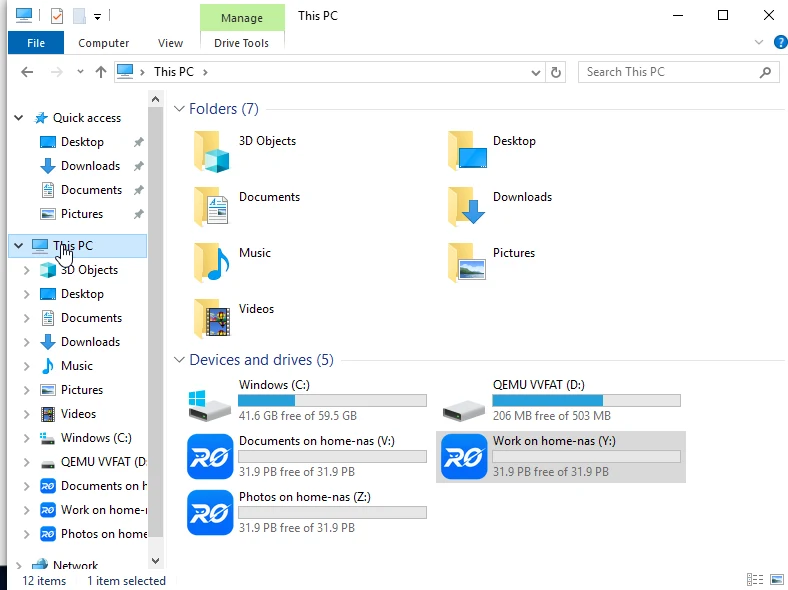
RocketZero ships today for Synology DSM 7, OpenMediaVault 7 and TrueNAS SCALE, with desktop apps for Windows and Apple Silicon Macs. On first launch on macOS you'll need to allow it in System Settings → Privacy & Security. Platform walkthroughs: Synology, OpenMediaVault, TrueNAS SCALE, or the RocketZero setup guide.
So which one should you pick?
You like running infrastructure
- Ask for a public IP first — it's free to ask.
- Otherwise a VPS + WireGuard, or Tailscale, gives you full control.
- Cloudflare Tunnel for anything you want on a public web address.
You just want your files
- Skip the router entirely: use something that connects outward.
- Want a drive letter or Finder, not a browser tab? RocketZero.
- Synology web apps only? QuickConnect is fine — and already installed.
You shouldn't need a networking certification to open a spreadsheet from the couch. Behind CGNAT, the trick is to stop fighting for an inbound port and let the NAS make the call.
FAQ
Can you port forward behind CGNAT?
Not on your own. Port forwarding on your router only works if your router owns a public IP address. Behind CGNAT, the public address belongs to your ISP's carrier-grade NAT box, shared with other customers, and only the ISP could forward ports on it — which they don't do for home users. You can ask for a public IP, use IPv6, or use a tool where the NAS connects out instead of waiting for connections in.
How do I know if I'm behind CGNAT?
Compare the WAN (internet) IP shown in your router's status page with the IP a site like whatismyip shows. If they're different — and especially if the router's WAN IP starts with 100.64 to 100.127 (the 100.64.0.0/10 range reserved for carrier-grade NAT) — you're behind CGNAT. If the router's WAN IP is a private address like 192.168.x.x or 10.x.x.x, you may instead be double-NATed behind your own ISP modem, which bridge mode usually fixes.
Will my ISP give me a public IP address if I ask?
Sometimes. Some ISPs will move you off CGNAT for free if you ask support, some charge for a static or public IP, and some (common with fixed-wireless and satellite plans) simply don't offer it on residential plans. It's always worth one polite support ticket before you build anything clever.
Does IPv6 get around CGNAT?
Often, yes — CGNAT is an IPv4 problem, and many ISPs that use it also hand out public IPv6. The catch: the network you're connecting from (office, hotel, phone carrier) also needs working IPv6, and you'll still need firewall rules and a hostname. Great when it works, unpredictable when you travel.
Does RocketZero work behind CGNAT?
Yes. The NAS-side package connects outward, so there's no port to forward and no public IP needed. Connections go direct peer-to-peer when the networks allow it and fall back to an encrypted relay when hole-punching fails. It runs on Synology DSM 7, OpenMediaVault 7 and TrueNAS SCALE.
Stuck behind CGNAT?
RocketZero mounts your NAS as a drive from anywhere — no port forwarding, no public IP, no extra account. Free to get started.
Download RocketZero Read the setup guide