Blog · Security
C3RB3R ransomware on Synology NAS: what's happening and what to do
Since early October 2026, a ransomware campaign known as C3RB3R has been encrypting Synology NAS devices that run outdated DSM. Files get a .L0CK3D extension and a read-me3.txt ransom note appears in each folder. On 29 October Synology confirmed the attacks. This page covers which DSM build to install, how to check whether your NAS was touched, and what to do if it was — sticking to what has actually been confirmed.
TL;DR
- Update DSM now to the latest build of the version you already run (table below). A strong password doesn't stop this; a patched DSM does.
- Check for signs of a break-in even after updating: unknown users, scheduled tasks you didn't create, odd sign-ins,
.L0CK3Dfiles. - If encryption is running right now: unplug the network cable, but don't reboot or power off, and get help.
- Keep a backup the NAS can't reach and turn on snapshots — that's what turns ransomware from a disaster into an inconvenience.
What is happening
Synology's statement of 29 October 2026 says threat actors are “exploiting a vulnerability patched in December 2024 to target devices running outdated versions of DSM”, with the aim of encrypting data and extorting a ransom. It points to Synology-SA-24:20, whose most serious flaw (CVE-2024-10441) lets an unauthenticated attacker run code through the DSM sign-in process.
That last part is why this campaign is nasty: the attack happens at the login page, before any password is checked. Your 24-character passphrase is perfectly strong; it just never gets asked.
Two more things have been reported and are worth knowing, with the caveat that they come from security vendors and individual victims rather than from Synology:
- Security firm 360 and several news sites link the campaign to the newer Synology-SA-26:13 flaws (CVE-2026-13639 and CVE-2026-13684, fixed 18 September 2026). Synology's own statement does not mention them. Updating to the latest build of your DSM line covers both advisories where Synology has published fixes.
- A published case report from one victim describes the attacker getting in through Telnet exposed on a public IPv6 address and keeping a hidden remote shell on the NAS for about five weeks before starting the encryption. Not every NAS will look like that one, but it's a good reminder that updating today doesn't evict someone who got in last month.
Step 1: update DSM to a patched build
Open Control Panel → Update & Restore and note the Current DSM version. Then install the latest build of that same version line. There's no need to jump to a newer major version to get the fix — Synology patches each supported line separately, and a same-line update is the one least likely to upset your packages.
| Your DSM | Update to (latest build) | SA-24:20 fixed from | SA-26:13 fixed from |
|---|---|---|---|
| 7.4 | 7.4.1-90080 Update 1 | not affected | 7.4-90075 |
| 7.3 | 7.3.2-86009 Update 5 | not affected | 7.3.2-86009-4 |
| 7.2.2 | 7.2.2-72806 Update 10 | 7.2.2-72806-1 | 7.2.2-72806-9 |
| 7.2.1 | 7.2.1-69057 Update 13 | 7.2.1-69057-6 | 7.2.1-69057-12 |
| 7.2 | 7.2-64570 Update 4 | 7.2-64570-4 | not listed |
| 7.0 / 7.1 / 7.1.1 | 7.1.1-42962 Update 9 | 7.1.1-42962-7 | not listed |
| 6.2 | 6.2.4-25556 Update 8 or later | 6.2.4-25556-8 | not listed |
Fixed-from versions are taken from Synology's advisories SA-24:20 and SA-26:13. “Not listed” means SA-26:13 doesn't list that version; DSM 7.3 and 7.4 were released after SA-24:20 and aren't affected by it. The latest builds for 7.4, 7.3, 7.2.2 and 7.2.1 were released on 12 October 2026.
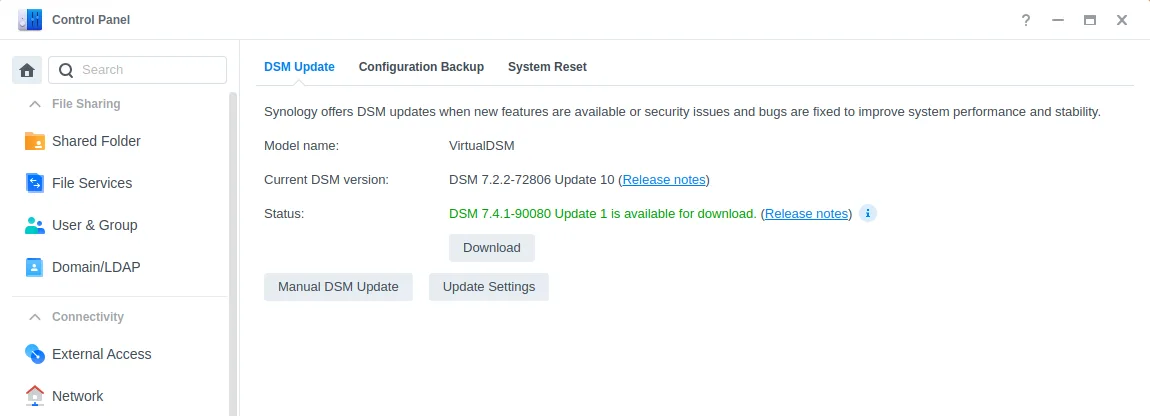
If the update doesn't show up in Update & Restore, download it yourself: go to the Synology Download Center, choose your exact model, open Operating System, download the build from the table, then install the .pat file with Manual DSM Update on the same screen.
Step 2: check whether anyone got in before you updated
Updating closes the door. It doesn't check who already came through it. Spend ten minutes on these:
- Control Panel → User & Group: any account you don't recognise, or an admin you didn't create.
- Control Panel → Task Scheduler: any task you didn't create, especially ones running scripts as root.
- Log Center: sign-ins from addresses or at times that don't make sense.
- Your shared folders: files ending in
.L0CK3Dor a file namedread-me3.txt. - Control Panel → Terminal & SNMP: turn off Telnet, and SSH too unless you actually use it.
If anything looks wrong, treat the NAS as compromised: back up what you need, then reset DSM rather than just updating it. A patched system with an intruder's scheduled task still on it is not a clean system.
If your NAS is being encrypted right now
- Unplug the network cable. This stops the attacker's remote access and stops the damage reaching other devices.
- Don't reboot or shut down. In the published case above, the encryption key was still in the memory of the running process, and that's how the files were recovered. A reboot throws that away.
- Don't pay straight away, and don't delete the ransom note or the encrypted files — they may be needed for recovery.
- Get help. Check No More Ransom for decryptors, contact Synology support, and if you use RocketZero, contact us — we'll help you look into what happened and with recovery where we can.
- Restore from snapshots or backups once the NAS has been reset and patched.
Step 3: make the next one boring
- Snapshots. Turn on Btrfs snapshots in Snapshot Replication for every shared folder that matters. On DSM 7.2 and later, where your model supports it, use immutable snapshots so that even an attacker with admin rights can't delete them for the retention period.
- An offline or off-site backup. A USB disk you unplug afterwards, or a backup to another location the NAS can't delete from. Ransomware with admin access can reach anything the NAS can write to.
- Don't put DSM directly on the internet. Close port forwards to 5000/5001, and check whether your NAS has a public IPv6 address. Every way the login page is reachable from outside is a way in when the next DSM flaw appears.
- Keep DSM current — and check Update & Restore yourself every few weeks, especially if your box doesn't receive updates automatically.
Where RocketZero fits — honestly
RocketZero gives each NAS an address like home-nas.roze.to without opening any ports on your router. Since 30 October 2026, every roze.to address has an extra layer of protection: sign-in requests carrying the exploit Synology tied to this campaign are blocked before they reach your NAS. Your address, the RocketZero app and your mapped drives keep working exactly as before.
What it doesn't do, so nobody is surprised later:
- It doesn't patch DSM. Other DSM flaws — including the SA-26:13 ones — are fixed only by updating.
- It doesn't cover other ways in: port forwarding, QuickConnect, a public IPv6 address, or Telnet/SSH exposed to the internet.
- It can't remove anything already on your NAS. That's Step 2.
If you use RocketZero and also have DSM open to the internet some other way, the simplest improvement is to close that other way and use only your roze.to address and the app. The drive mount runs over WireGuard and never exposes the DSM sign-in page at all. Setup takes a few minutes: RocketZero setup guide.
FAQ
Does a strong password or 2-factor authentication protect my Synology from C3RB3R?
Not on its own. Synology says the attackers exploit a vulnerability fixed in Synology-SA-24:20, which sits in the DSM sign-in process itself and is reached before your password or 2FA code is checked. Keep strong passwords and 2FA, but the fix is installing a patched DSM build.
Which DSM versions are safe?
Any build at or above the fixed releases in Synology-SA-24:20 (for example 7.2.2-72806-1, 7.2.1-69057-6, 7.2-64570-4, 7.1.1-42962-7). Some reports also link the campaign to SA-26:13 (fixed September 2026), so the safest choice is the latest build of the DSM version you already run — see the table in this article.
Should I jump to DSM 7.4 to be safe?
You don't need to. Every supported DSM line has its own patched builds. Updating to the newest build of the line you already run (for example 7.2.2 → 7.2.2-72806 Update 10) closes the hole with the least risk of breaking packages. A major upgrade is a separate decision for a calmer day.
Is my NAS exposed if I only use QuickConnect?
QuickConnect makes your DSM sign-in page reachable from the internet, just as port forwarding does. If your DSM is outdated, treat it as exposed and update. The same goes for a NAS with a public IPv6 address, which is often reachable even when you never forwarded a port.
Can .L0CK3D files be decrypted?
We're not aware of a public decryptor at the time of writing. Check No More Ransom for updates. In one published case the key was recovered from the memory of the still-running encryptor, which is why you should not reboot or power off a NAS that is being encrypted.
Does RocketZero protect my NAS from this ransomware?
Partly, and only on the RocketZero path. Since 30 October 2026, requests to your <id>.roze.to address are filtered for the sign-in exploit Synology tied to this campaign, so they never reach your NAS. It does not patch DSM, does not cover DSM reached through port forwarding, QuickConnect or IPv6, and cannot remove anything already installed. Update DSM regardless.
Reach your NAS without putting DSM on the internet
RocketZero mounts your NAS as a drive from anywhere — no port forwarding, works behind CGNAT, no extra account. Free to get started.
Download RocketZero Read the setup guide