Blog · Guide
How to map your Synology as a network drive over the internet
Mapping \\my-nas\share is a two-click miracle — right up until you leave the house and it points at nothing. Here are the honest ways to map a Synology as a network drive over the internet, why most of them ask you to open a port you really shouldn't, and the one that skips that ritual entirely.
TL;DR
- A mapped drive like
\\my-nas\shareonly works on your home LAN — that name doesn't resolve from anywhere else. - The classic remote methods — forwarding SMB, WebDAV over HTTPS, or a full VPN — all work, but two of them ask you to expose a login (or worse, port 445) to the internet, and none work cleanly behind CGNAT.
- RocketZero maps your NAS as a real SMB drive over an encrypted WireGuard tunnel — no open ports, no DDNS, works behind CGNAT — and it does the mapping for you.
The classic way
- 1Enable WebDAV (or forward SMB) on the NAS
- 2Open a port on your router + set up DDNS
- 3Install a WebDAV client or trust the exposed share
- 4Map the drive to https://your-ddns:5006 by hand
- 5Re-check it every time your IP or router changes
Works, but you've now published a door to the internet and you maintain it forever.
The drive-mount way
- 1Install the RocketZero package on the Synology
- 2Install the app — it mounts your NAS as a drive
The drive appears by itself. No port, no DDNS, no address to type.
Why your mapped drive vanishes the moment you leave
At home, mapping the NAS is glorious: \\my-nas\share, pick a drive letter, done. That works because your laptop and your NAS are on the same local network, and my-nas is a name that only means something there. Step onto café Wi-Fi and that name resolves to precisely nothing — there's no route from the open internet to a private device sitting behind your router.
So "map my Synology over the internet" is really one question: how do I get a route to the NAS from outside? There are four honest answers, and they differ mostly in how much of your NAS you have to expose to strangers to get there.
The classic routes (and their catches)
Credit where it's due — every one of these works, and people have run them for years. They just come with strings attached.
Forward SMB (port 445) to the NAS. The tempting one: forward the SMB port on your router and map \\your-public-ip\share. Please don't. Port 445 is among the most relentlessly scanned and attacked ports on the internet, and exposing it is a recurring headline in ransomware post-mortems. Fast to set up, genuinely dangerous.
WebDAV over HTTPS. The one most remote-mapping guides actually recommend: enable Synology's WebDAV Server, get a certificate, forward port 5006, and map the drive to https://your-ddns:5006. It's encrypted in transit and far safer than raw SMB — but you're still publishing a login page to the world, and WebDAV can be fiddly with large files, file locking, and apps that expect a genuine drive rather than a web mount.
A VPN back home. The prosumer favourite: run a VPN server (WireGuard, OpenVPN, or Synology's own) so your laptop joins your home network, then map \\my-nas\share as if you were on the couch. Technically excellent and properly private. The catch is that it's the most setup, and it still stumbles behind CGNAT unless you add a relay — plus a VPN gives you the whole network when you only wanted one drive.
The four routes, side by side
| What matters | Forward SMB | WebDAV | VPN | RocketZero |
|---|---|---|---|---|
| Opens a port to the internet | ✕ Yes — port 445 (risky) | ✕ Yes — 5006 (HTTPS) | ✓ No | ✓ No |
| Works behind CGNAT / no public IP | ✕ No | ✕ No | ✕ Sometimes | ✓ Yes |
| Gives you a real SMB drive | ✓ Yes | ✕ No — WebDAV | ✓ Yes | ✓ Yes |
| Encrypted end-to-end | ✕ No | ✕ TLS to the NAS | ✓ Yes | ✓ Yes |
| Setup effort | ✕ Medium + risky | ✕ Medium | ✕ High | ✓ Two installs |
| You map the drive yourself | ✕ Yes | ✕ Yes | ✕ Yes | ✓ No — automatic |
The pattern: the easy methods expose something to the internet, and the safe method (a VPN) is the most work. RocketZero is trying to be the safe and easy corner of that table.
The drive-mount way: a real SMB drive, no open ports
RocketZero takes the VPN idea — carry SMB inside an encrypted tunnel so nothing is exposed — and removes the part where you build and babysit the VPN. Under the hood it's WireGuard (the same modern encryption a mesh VPN uses) with a self-hosted control plane, so the NAS and your computer connect directly, peer-to-peer when the network allows it and fall back to an encrypted relay when it can't punch through.
The practical upshot: the drive mount is end-to-end encrypted. On a direct path your files never touch our servers; on a relay the relay only ever sees ciphertext. There's no port to open, no DDNS to maintain, and it works behind CGNAT — the exact situation where port forwarding is off the table because you don't even have a public IP.
And because it speaks real SMB, you get a real drive — a proper V: on Windows or a mounted volume in Finder on a Mac — not a web mount pretending to be one. You sign in with your existing NAS username and password (there's no separate RocketZero account), and those credentials live in the OS keychain, never in plaintext and never on our servers.
One honest caveat: RocketZero also gives your NAS a friendly your-nas.roze.to address that opens DSM in a browser — that web path is a hosted reverse proxy (same trust model as Cloudflare Tunnel), not end-to-end encrypted. It's the drive mount that's E2E. Different job, different guarantee.
What it actually looks like
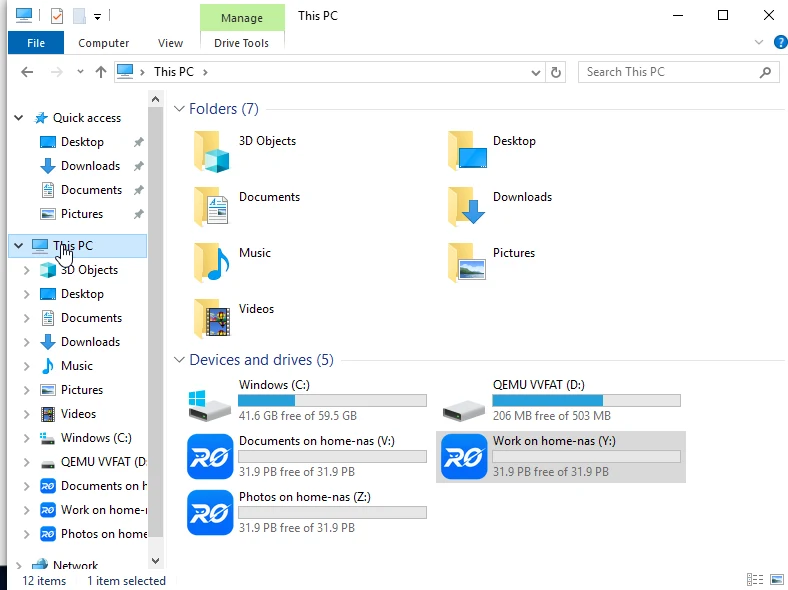
After the two installs, the NAS shows up in Windows Explorer under "This PC" as ordinary drive letters — the same place your USB stick lands. Open, edit, and save straight off it; the fact that the bytes are travelling across an encrypted tunnel from the other side of the country is invisible.
So which should you pick?
Reach for a VPN if…
- You want your laptop to join the whole home network, not just the NAS.
- You enjoy running infrastructure and want full control of the tunnel.
- You have a public IP (or a relay) so CGNAT isn't in your way.
Reach for RocketZero if…
- You specifically want the NAS as a mapped drive — open, edit, save like local.
- You'd rather not open a port or maintain DDNS, and you may be behind CGNAT.
- You want it to just appear — no IPs to map, nothing to administer.
FAQ
Why can't I just map \\my-nas\share when I'm away from home?
Because that address is a private LAN name that only resolves on your home network. From a café it points nowhere. To reach the NAS from outside you need a route into the network — port forwarding, WebDAV over HTTPS, a VPN, or a WireGuard-based drive mount like RocketZero. The address you type stops being \\my-nas and becomes whatever that route gives you.
Is it safe to map a NAS drive over the internet?
It depends entirely on how. Forwarding SMB (port 445) straight to the internet is not safe — it's one of the most attacked ports there is, and ransomware loves it. WebDAV over HTTPS is safer but you're still publishing a login page. A VPN or a WireGuard tunnel (what RocketZero uses) is the safe version: the drive is only reachable through an encrypted tunnel, and nothing is exposed to the open internet.
Do I need to open a port or set up DDNS?
Not with a tunnel-based approach. RocketZero connects the NAS and your computer over WireGuard, so there are no inbound ports to open and no dynamic-DNS to maintain. It also works behind CGNAT, where port forwarding isn't even an option. The old WebDAV and port-forward methods do need an open port and usually DDNS.
WebDAV or SMB — which should I map?
For local use, SMB is the native, fast choice. Over the internet, plain SMB shouldn't be exposed directly, so the classic remote guides fall back to WebDAV over HTTPS — which works but can be finicky with large files, locking and some apps that expect a real drive. RocketZero lets you keep real SMB remotely by carrying it inside an encrypted tunnel, so you get the native drive behaviour without exposing port 445.
Can I map the drive on a Mac too?
Yes. RocketZero has a macOS app; once it's running the NAS mounts in Finder just like it does on Windows. Same idea, same encrypted path — you just get a mounted volume instead of a V: drive.
Map your NAS as a drive — from anywhere
RocketZero mounts your Synology as a real network drive over an encrypted tunnel. No port forwarding, free to get started.
Download RocketZero Read the setup guide