


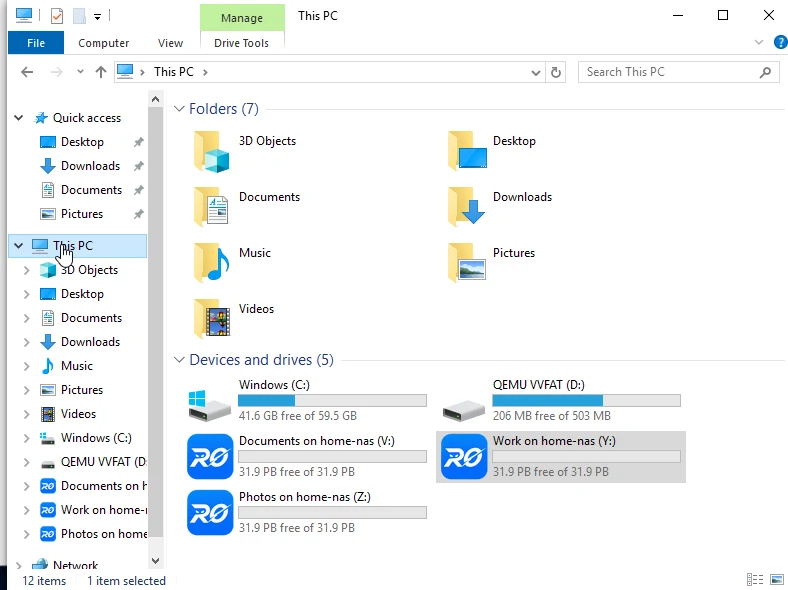
Map as a real drive
Open, edit and save in Explorer or Finder — exactly like a drive plugged into your computer.

No port forwarding. No networking setup. Map your NAS as a local drive and reach its web UI remotely — at your own free address like home-nas.roze.to.
Works with Synology · OpenMediaVault · TrueNAS · Apps for Windows & macOS
Get started
Pick your NAS
Real screenshots and a short walkthrough video for each platform — install RocketZero, then mount it as a drive.
Everything you need
RocketZero handles the cases that trip up other remote-access tools — no public IP, no open ports, no setup on every device.
Open, edit and save in Explorer or Finder — exactly like a drive plugged into your computer.
Nothing exposed on your router. Your DSM stays off the public internet.
No public IP from your ISP? RocketZero still connects — no port forwarding.
Your photo gallery and the full NAS admin interface, from anywhere.
A peer-to-peer link when possible; an encrypted relay keeps working when it isn’t.
A real HTTPS address like home-nas.roze.to — no IP addresses, no DDNS.
Private by design
Your NAS never needs inbound ports exposed to the internet. Nothing to forward on your router, and no NAS ports left open to the internet.
Traffic is encrypted between your device and your NAS — including when a relay is required.
A peer-to-peer connection is used when possible; the relay only handles traffic when a direct connection isn’t available.
How it compares
QuickConnect, a VPN, or DDNS with port forwarding each solve part of this. RocketZero is built for one job — your NAS as a drive — and does all of it.
| What you want | QuickConnect | VPN / Tailscale | DDNS + Ports | RocketZero |
|---|---|---|---|---|
| Open files as a real drive | ✕ | ~ | ~ | ✓ |
| No open ports on your router | ✓ | ✓ | ✕ | ✓ |
| Works behind CGNAT / no public IP | ✓ | ✓ | ✕ | ✓ |
| Your own HTTPS domain for your NAS | ~ | ✕ | ~ | ✓ |
| Encrypted end-to-end | ✓ | ✓ | ~ | ✓ |
✓ yes · ~ possible, with setup or caveats · ✕ no
Under the hood
Install once. Your NAS dials out over an encrypted tunnel — no ports, no DDNS, no static IP — and your device connects straight to it peer-to-peer when possible, or through the relay when a direct link isn’t available.
Questions
Synology (DSM), OpenMediaVault and TrueNAS SCALE. Each has a step-by-step guide: Synology, OpenMediaVault, TrueNAS. On Synology, just pick the package that matches your CPU (Intel/AMD or ARM) and install it from Package Center.
QuickConnect lets you browse files in a web browser or app; RocketZero mounts your NAS as a real drive on your machine, so you can open, edit and save files directly. RocketZero also gets you your own address like <your-name>.roze.to with HTTPS built in. See the detailed comparison.
No. RocketZero doesn’t need any open ports on your router or NAS, so your DSM interface stays off the internet. Everything is encrypted.
Your NAS is what gets activated — no license keys to manage. Install the app on as many of your own computers as you like and sign in to that same NAS; there’s no machine limit.
Download the app and the NAS package — that’s it. No account or license key required to get started.
RocketZero has a free plan — install it and your NAS mounts as a drive, no subscription to buy. Optional Pro features may come later for users who need more.
Yes. Many home and mobile connections sit behind carrier-grade NAT with no public IP, so port forwarding and DDNS simply can’t work. RocketZero connects out from your NAS and meets your computer through our relay, so it works even without a public IP — no router or ISP changes needed.
On your own computer, in your operating system’s secure store — the Keychain on macOS and DPAPI (per-account encryption) on Windows — never in plain text. It’s used to sign in to your NAS so drives reconnect automatically. Your NAS password is verified directly by your NAS and is never sent to RocketZero’s servers.
Install RocketZero and turn your NAS into a remote drive in minutes — free to get started.