Blog · Comparison
Synology QuickConnect alternatives (2026)
QuickConnect is a genuinely nice piece of engineering — right up until the afternoon it's crawling, or quietly down, and you're staring at a spinner instead of your files. If you've started shopping for a replacement, here are the real alternatives for reaching your Synology from anywhere, compared honestly.
TL;DR
- QuickConnect is free, easy, and gives you DSM + Synology's apps in a browser. Its two sore spots: it can route you through a shared, rate-limited relay (that's the "why is it so slow" feeling), and it's a browser tab, not a mounted drive.
- The alternatives, roughly: a VPN or Tailscale if you want a whole network; Cloudflare Tunnel if you want to publish one web app; RocketZero if you specifically want your NAS to show up as a drive.
- Whatever you pick, aim for one that connects direct peer-to-peer (full speed) and doesn't dump your NAS on the open internet.
First, credit where it's due
QuickConnect solves a real, annoying problem — reaching your NAS without port forwarding, DDNS, or a networking certification — and it does it with a single toggle and a memorable id. For a lot of people that's genuinely all they need, and there's no shame in leaving it on. Below is the actual settings page: enable it, pick an ID, done.
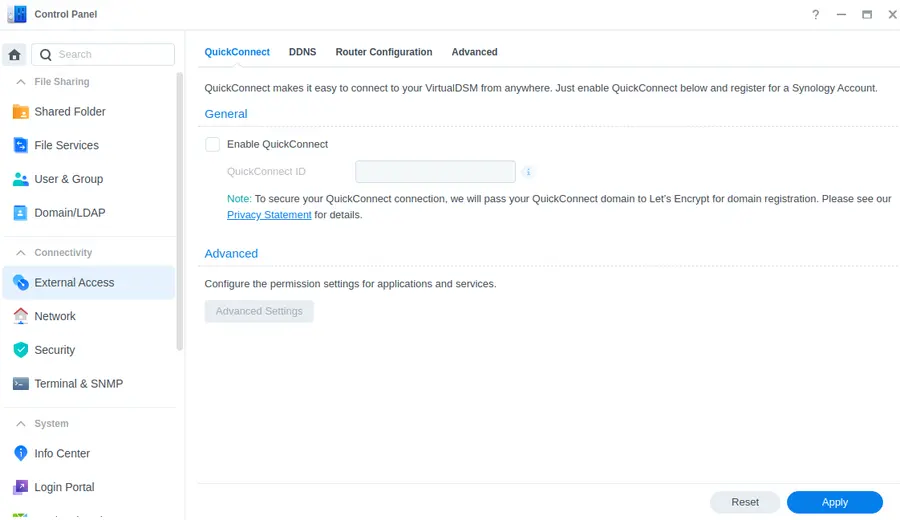
So why are you here? Almost always one of two reasons.
Why people go looking for something else
1. It gets slow. QuickConnect attempts a direct or hole-punched connection, but when your network won't allow that, it falls back to Synology's relay — which is shared across a lot of users and deliberately rate-limited. On a good day you never notice; on a bad one, a large upload feels like posting a letter. This is the single most common QuickConnect complaint on Reddit and the Synology forums, and it isn't a bug you can fix — it's the relay doing its job.
2. It's a browser tab, not a drive. QuickConnect opens DSM, File Station and Synology's apps in a browser (plus their mobile apps). What it doesn't do is give you a network drive — a V: in File Explorer or a share in Finder that you open, edit and save to like a local disk. If your goal is "my NAS, as a folder, from the coffee shop," QuickConnect can't get you there on its own.
A distant third: it occasionally has an outage, and — being tied to a Synology Account and Synology's infrastructure — when it's down, it's down for everyone at once.
The alternatives, compared
There's no single winner here; it depends on whether you want a network, a published web app, or a drive. The honest lay of the land:
| Method | What you actually get | Effort | Separate account? | Mounts a drive? |
|---|---|---|---|---|
| QuickConnect | Web DSM + Synology's apps, via relay | Low | Yes — Synology Account | ✕ Browser only |
| Port forwarding + DDNS | Direct web/apps — but your NAS is on the open internet | Medium (+ risk) | No | ✕ Browser only |
| VPN (WireGuard / OpenVPN) | A tunnel into your whole home network | Medium–High | No | △ Manual mapping |
| Tailscale | A mesh VPN across all your devices | Medium | Yes — tailnet login | △ Manual mapping |
| Cloudflare Tunnel | One web app published to the internet | Medium | Yes — Cloudflare | ✕ Browser only |
| RocketZero | Your NAS mounted as a real drive + DSM at id.roze.to | Low | No — your NAS login | ✓ Mounts a drive |
- Port forwarding + DDNS is the old-school route: fast and direct, but you're opening your NAS to the entire internet, which is exactly how ransomware finds Synology boxes. We'd talk most people out of it.
- A VPN (Synology's own VPN Server, or WireGuard) is the safe classic — a tunnel into your home network. Once connected you can map the drive by hand. Solid, if you don't mind the setup and the "connect the VPN first" ritual.
- Tailscale is the crowd favourite replacement, and it's excellent — a mesh VPN across all your devices, direct peer-to-peer. The catch: it hands you a whole network to manage when you may have just wanted your files. (We wrote a whole honest comparison: RocketZero vs Tailscale.)
- Cloudflare Tunnel is great for publishing one web app to the internet behind Cloudflare's edge — but it's a web pipe, not a drive, and not end-to-end private. (Details: RocketZero vs Cloudflare Tunnel.)
- RocketZero is the one built specifically to scratch the "I just want the drive" itch — more on that next.
If what you wanted was the drive
RocketZero is a self-hosted take on the QuickConnect idea, aimed at one job: mount your Synology as a real network drive on Windows or macOS, from anywhere. Install the package on the NAS, install the desktop app, and your shares show up as drives — no IP to find, nothing to map. You also get a clean id.roze.to address that opens DSM in a browser with HTTPS already sorted, so you don't lose the thing QuickConnect was good at.
Under the hood it's the same modern stack Tailscale uses — WireGuard with a self-hosted control plane — so it connects direct peer-to-peer whenever the network allows (full speed, no shared relay), and the drive/SMB path is end-to-end encrypted. There's no separate account: you sign in with the NAS username and password you already have, stored in the OS keychain. When a direct path isn't possible it falls back to an encrypted relay that only ever sees ciphertext.
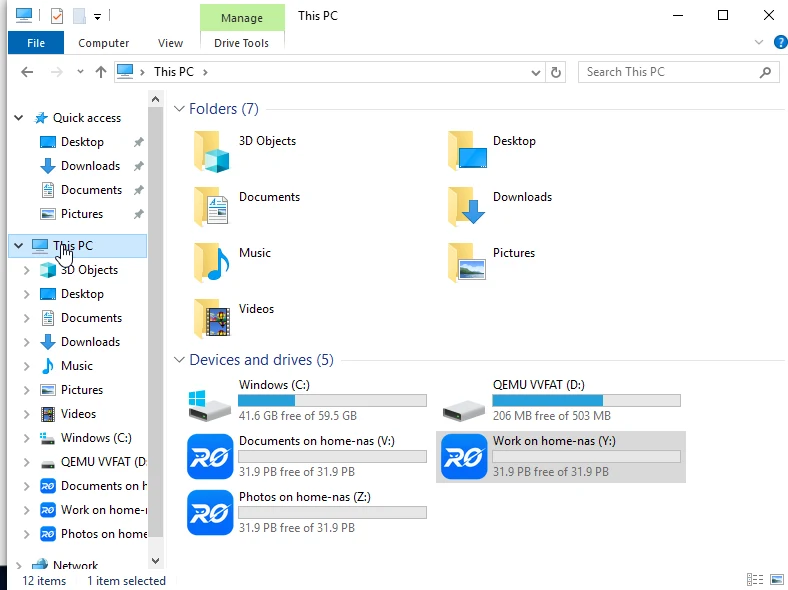
To be fair to QuickConnect: RocketZero's browser address (id.roze.to) is a hosted reverse proxy, so — like QuickConnect's relay — that path isn't end-to-end encrypted. The drive mount is. Pick the tool for the job you actually have.
So which alternative should you pick?
Stay on QuickConnect if…
- It's fast enough for you and you mostly use DSM in a browser.
- You don't need a mounted drive or the last drop of speed.
- "One toggle, done" is worth more to you than direct-path throughput.
Switch to a drive-mount (RocketZero) if…
- You want your NAS as an actual drive, not a browser tab.
- You're tired of relay-throttled speeds and want direct peer-to-peer.
- You want no separate account and nothing to manage — for you or a non-technical user.
FAQ
Is Synology QuickConnect safe to use?
For most people, yes — it's TLS-encrypted and Synology maintains it. The nuance: your DSM login page is reachable through Synology's relay, so the usual advice applies — use a strong password, turn on 2-factor, and keep DSM patched. If you'd rather your NAS not be reachable from a browser at all, a drive-mount tool like RocketZero or a VPN keeps the login surface off the open web.
Why is my Synology QuickConnect connection so slow?
Usually because your traffic is going through Synology's relay instead of a direct connection. QuickConnect tries a direct or hole-punched path first, but when your network blocks that (strict NAT, some CGNAT setups), it falls back to a shared, rate-limited relay — and that's the speed you feel. Anything built on direct peer-to-peer (Tailscale, RocketZero) gets full speed whenever the network allows a direct path.
Is QuickConnect free?
Yes. QuickConnect is free with your Synology NAS — you just need a (free) Synology Account to register a QuickConnect ID. RocketZero is also free to get started and uses your existing NAS username and password, so there's no extra account to create.
Can I map a network drive over QuickConnect?
Not really — that's the catch. QuickConnect gives you DSM and Synology's own apps in a browser (and their mobile apps), but it doesn't hand you an SMB network drive you can open in File Explorer or Finder. To get a real mounted drive over the internet you need a VPN (and some manual mapping) or a tool like RocketZero that mounts it for you.
What's the best QuickConnect alternative for non-technical users?
If someone just wants their NAS to show up as a drive and doesn't want to manage a network, RocketZero is the least-fuss option: install the package, install the app, done — no account, no ACLs, no IP addresses. If they're comfortable managing a tailnet and want a general VPN, Tailscale is excellent. If they only need one web app published, Cloudflare Tunnel fits.
Want the drive, not the spinner?
RocketZero mounts your Synology as a drive in minutes — direct, encrypted, no extra account. Free to get started.
Download RocketZero Read the setup guide